Free YouTube Earnings Estimator, No Signup

YouTube Money Calculator: Estimate Your Channel's Earnings

Wondering how much your favorite YouTubers make, or trying to forecast your own channel's revenue? Use our free YouTube Money Calculator to estimate daily, monthly, and yearly earnings based on views and average CPM.

By SEOWebster Team ·

Estimates use industry RPM ranges. Actual payouts vary by ad fill rate, watch time, and seasonality.

How to Use the YouTube Earnings Calculator

1

Step 1

Drag the slider or enter your daily/monthly video views.

2

Step 2

Set your estimated CPM (Cost Per Mille) or RPM (Revenue Per Mille) via your niche and country.

3

Step 3

View your estimated daily, monthly, and yearly AdSense earnings.

Q

Quick Answer

A YouTube money calculator estimates your AdSense earnings based on views, niche, and audience country. Most long-form YouTube creators earn between $1 and $5 per 1,000 views (RPM), with finance and business niches reaching $15 or more, and entertainment or kids channels closer to $0.50. Enter your numbers in the tool above to get a realistic low, average, and high payout for your channel.

What This Tool Does

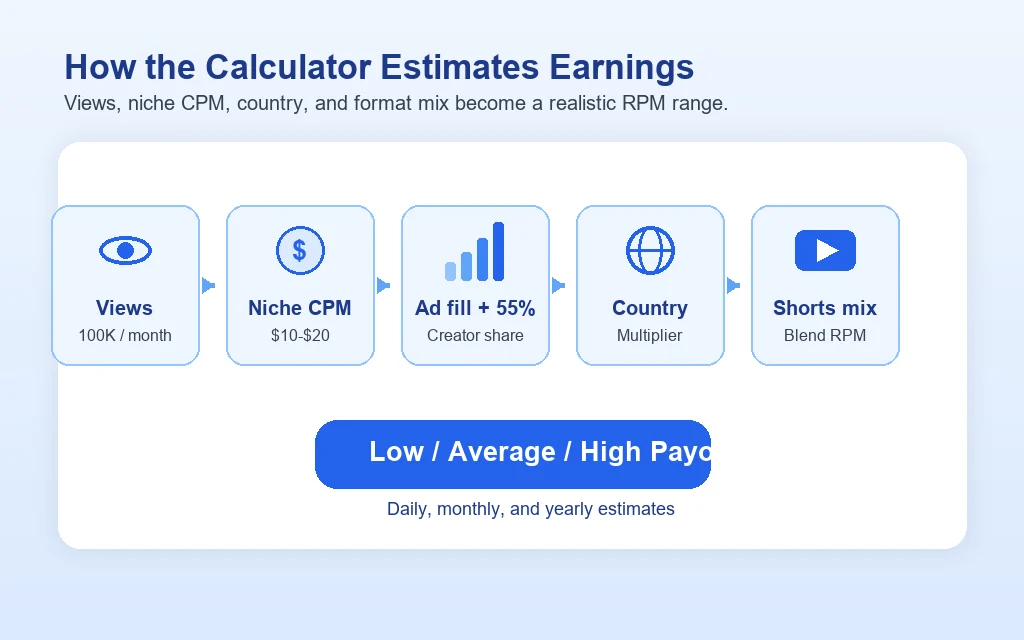
The SEOWebster YouTube Money Calculator turns three numbers - your views, your niche, and your audience country - into a realistic estimate of your YouTube AdSense payout. It uses CPM (cost per 1,000 ad impressions) ranges that advertisers actually bid in each vertical, then applies YouTube's 55% creator share and a typical monetized-playback rate to convert advertiser spend into your real take-home RPM.

The output is not a single fragile guess. You see a low, average, and high range for daily, monthly, and yearly earnings, so you can plan a channel income that holds up even when CPMs dip in January or spike in December. Whether you are validating a new channel idea, negotiating a brand deal, or modelling when you can quit your day job, this calculator gives you a defensible number to work from.

Diagram showing how the YouTube money calculator combines views, niche CPM, ad fill, creator share, country multiplier, and Shorts mix into daily, monthly, and yearly earnings

Features of This Tool

Niche-Specific CPMs

Uses real 2026 advertiser bid ranges for 18 different content verticals.

Country Multipliers

Scales earnings up or down based on viewer geography and purchasing power.

Shorts Integration

Properly blends much lower Shorts RPM with standard long-form video payouts.

Three-Tier Modeling

Provides low, average, and high estimates to account for seasonality.

Instant Projection

Calculates daily, monthly, and yearly take-home RPM immediately.

Client-Side Privacy

All calculations happen in your browser without logging financial data.

Why Use a Earnings Calculator

  1. Business Planning: Decide if a new channel concept has enough advertiser demand to be financially viable before shooting videos.
  2. Sponsorship Pricing: Validate your channel's worth when pitching brands by pointing to standard niche CPM rates.
  3. Revenue Forecasting: Model your expected income at different growth milestones (1M, 5M, 10M views).
  4. Expectation Setting: Learn why gaming channels require ten times the traffic of finance channels to earn the same full-time income.
  5. Audience Strategy: See the direct financial impact of shifting your content to target Tier 1 countries versus emerging markets.
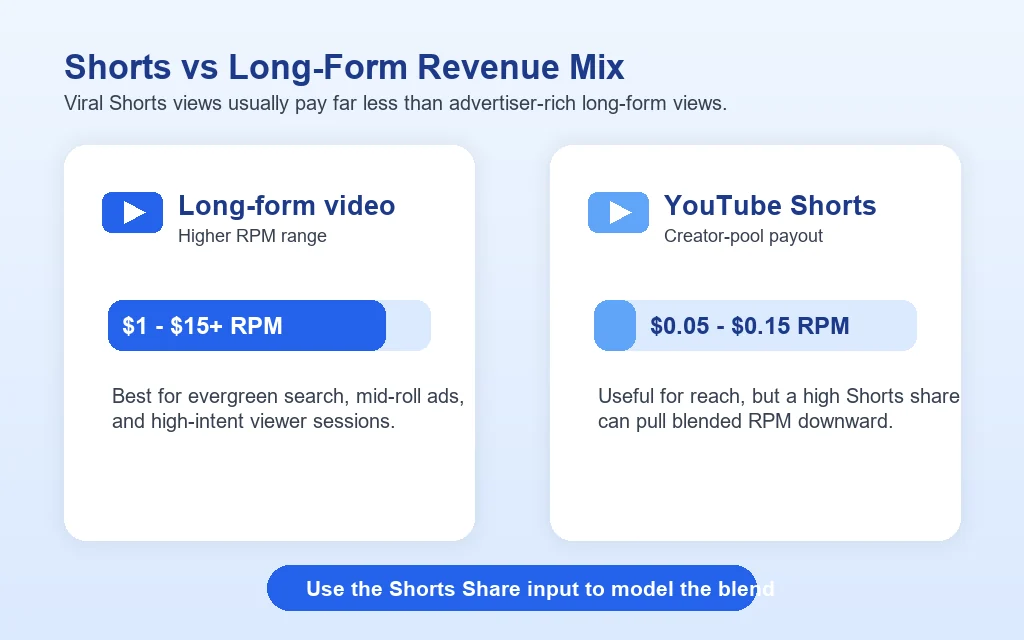
  6. Format Balancing: Understand how chasing viral Shorts views impacts overall channel RPM compared to long-form evergreen content.
Comparison graphic showing long-form YouTube videos earning higher RPM than YouTube Shorts and explaining how Shorts share lowers blended revenue

Strong YouTube Earnings Strategy

A robust YouTube monetization strategy doesn't just rely on hoping for high CPMs. It optimizes all variables that influence the amount of money you actually take home per video. True domain expertise in YouTube earnings requires optimizing for these key metrics:

  • Niche Alignment: Content closely aligned with high-budget B2B or consumer finance advertisers.
  • Video Length: Prioritizing videos over 8 minutes to seamlessly integrate extra mid-roll ad inventory.
  • Watch Time: High viewer retention natively equates to more ad impressions per single video click.
  • Geographic Targeting: Formatting language and topics to intentionally attract viewers from high-GDP regions.
  • Content Safety: Avoiding controversial topics, swearing, or copyright claims that result in limited ads (yellow icon).
  • Viewer Age: Minimizing strictly "made for kids" content which removes personalized ads and tank your RPM under COPPA guidelines.

YouTube Revenue Checklist

Technical

Ad Settings

Content

Format Strategy

Audience

Geolocation

Strategy

Diversification

How YouTube Pays Creators

YouTube AdSense revenue flows through four key numbers, and most creators only know one of them. Understanding the full chain is the difference between a wishful guess and an estimate you can plan against.

  • CPM (Cost Per Mille): What advertisers pay YouTube for every 1,000 ad impressions. Set by auction and varies wildly by niche, country, season, and ad format.
  • Monetized Playback Rate: The share of your views that actually serve an ad. Typically 40 to 60% on long-form, far lower on Shorts. Ad blockers, kids' content rules, and unsuitable content flags all drag this down.
  • Creator Share: YouTube keeps 45% of long-form ad revenue and pays you 55%. For Shorts, the model is a creator pool split rather than direct ad share.
  • RPM (Revenue Per Mille): Your actual take-home per 1,000 total video views, after every deduction. This is the number that lands in your AdSense dashboard.

Our calculator chains all four together for you. You enter views, we apply the niche CPM range, multiply by the monetized rate, take the 55% creator share, then scale by your audience country to produce the RPM-based estimate shown above.

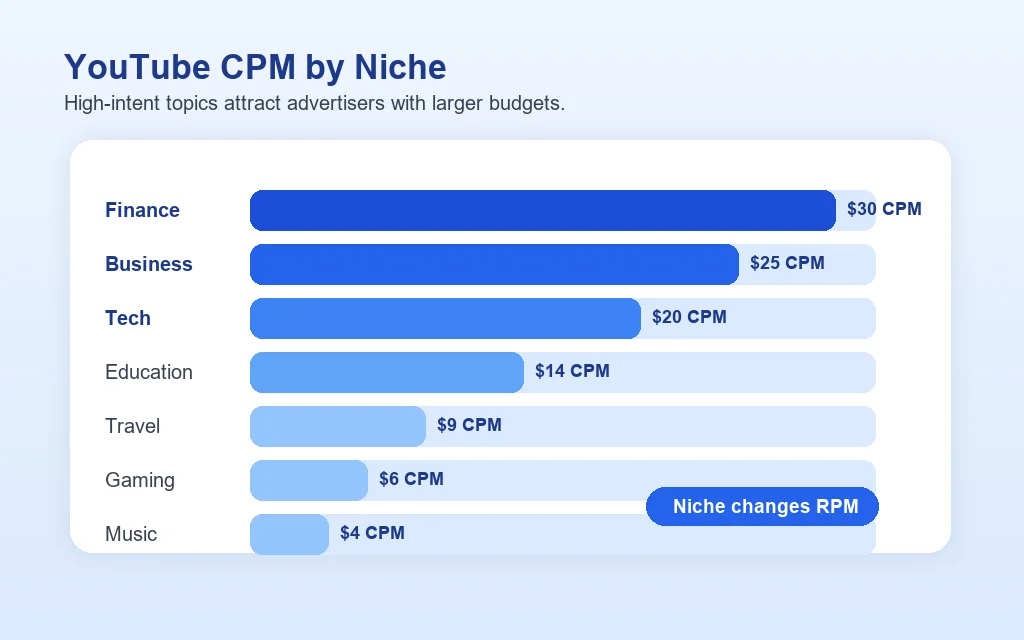
YouTube CPM by Niche

Niche is the single biggest lever on your YouTube earnings. A finance channel and a music reaction channel with identical view counts can earn 10 to 20 times different amounts. Here is the typical CPM advertisers pay in each major vertical, based on aggregated 2025 benchmark data:

Horizontal bar chart comparing YouTube CPM by niche, with finance, business, and technology earning more than travel, gaming, and music
Niche CPM Range (USD) Estimated Creator RPM
Insurance & Legal$20 – $50$5.50 – $13.75
Finance & Investing$15 – $30$4.10 – $8.25
Business & Marketing$12 – $25$3.30 – $6.90
Real Estate$12 – $25$3.30 – $6.90
Tech & Software$10 – $20$2.75 – $5.50
Education & How-to$6 – $14$1.65 – $3.85
Health & Fitness$5 – $12$1.40 – $3.30
Beauty & Fashion$4 – $10$1.10 – $2.75
Lifestyle & Vlog$3 – $8$0.85 – $2.20
Gaming$2 – $6$0.55 – $1.65
Music & Entertainment$1 – $4$0.30 – $1.10

Estimated creator RPM assumes 50% monetized playback rate and YouTube's standard 55% creator share. Your actual RPM may be higher with strong watch time and advertiser-friendly content, or lower with skipped ads, ad blockers, and demonetization flags. To pair high CPM topics with strong CTR, see our YouTube thumbnail design tips guide.

Why Audience Country Matters

Two creators in the same niche with the same views can earn very different amounts based purely on where their audience watches from. Advertisers pay much more to reach a viewer in the United States or Australia than one in India or Indonesia, because the advertised products cost more and convert at higher prices in those markets.

Here is roughly how regions compare to a Tier 1 baseline of 1.0x:

  • Tier 1 (US, UK, CA, AU, DE): 1.0x - the highest CPMs on the platform.
  • Western Europe: ~0.85x - strong but slightly below the US.
  • Eastern Europe: ~0.5x - about half of Tier 1.
  • Developed Asia (JP, KR, SG): ~0.65x.
  • Latin America: ~0.4x.
  • Emerging Asia (IN, ID, PH, VN): ~0.3x.
  • Sub-Saharan Africa: ~0.25x.

This is why English-language channels targeting the US often out-earn larger channels in other languages. If you can produce content that ranks in Tier 1 markets, your effective RPM rises sharply, even at the same view count.

Understanding CPM vs. RPM

The most common mistake creators make is confusing CPM with RPM. Knowing the difference saves you from disappointing pay-day surprises:

  • What is CPM? "Cost Per 1,000 Impressions" is what the advertiser pays YouTube. It is reported in YouTube Studio under Monetized playbacks CPM and is calculated only against the views that actually showed an ad.
  • What is RPM? "Revenue Per Mille" is what the creator actually takes home per 1,000 total video views, after YouTube takes its 45% cut and after non-monetized views are factored in.

Why it matters: Creators should focus on RPM for accurate estimates, as RPM is always lower than CPM and is the number that maps to real dollars in your AdSense balance.

Factors Affecting Earnings

  • Your Channel's Niche: Finance, Business, and Tech channels have significantly higher CPMs than Gaming or Vlog channels, often earning 10 to 20 times more per view.
  • Audience Demographics: Viewers from the US, UK, and Australia (Tier 1 markets) generate higher ad revenue than viewers from developing nations, because advertised products cost more in those markets.
  • Video Length: Videos over 8 minutes can have mid-roll ads. This extra ad inventory can easily double or triple your revenue.
  • Engagement Rates: Higher watch time and ad interaction affect payouts, as longer average view duration means more ad slots served per viewer.

How to Get Monetized

To start earning AdSense revenue, your channel must meet the requirements for the YouTube Partner Program (YPP):

  • Standard YouTube Partner Program (YPP): 1,000 subscribers + 4,000 public watch hours in the last 365 days (or 10 million Shorts views in the last 90 days). This grants full access to AdSense revenue sharing.
  • Early Access YPP (Fan Funding): 500 subscribers + 3,000 public watch hours in the last 365 days (or 3 million Shorts views in the last 90 days). This unlocks fan funding features like Super Chats, Super Stickers, Super Thanks, and Channel Memberships.

Ways Creators Make Money

Most full-time creators earn the majority of their income outside of AdSense. Here are the most lucrative paths:

  • Sponsorships and Brand Deals: Integrating brand messages directly into your videos.
  • Affiliate Marketing: Earning commissions via Amazon links, software referrals, and affiliate platforms in your description.
  • Merchandise & Digital Products: Selling courses, templates, presets, and physical merch to your audience.
  • Channel Memberships & Super Chats: Native YouTube features that allow super fans to pay for perks or highlight their messages during live streams.
  • Patreon/Crowdfunding: Earning recurring monthly revenue from your most dedicated viewers.

How Earnings Are Calculated

Our calculator does not use flat guesses. We apply a sequential, transparent methodology that maps advertiser CPM all the way down to creator AdSense RPMs. Here is the step-by-step breakdown of how your final payout estimate is constructed:

Step Variable Impact Ratio / Max Capability What It Represents
Base Advertiser CPM $1.00 to $50.00+ The amount advertisers bid per 1,000 ad impressions in your selected niche.
Monetized Playback Rate ~50% (0.50x multiplier) Limits gross CPM because many views use ad-blockers, skip ads, or don't trigger an auction.
Creator Split Share 55% (0.55x multiplier) YouTube's standard contractual payout rate to long-form creators.
Country Deflation 0.25x to 1.00x Scales the remaining RPM based on the localized purchasing power of your audience.
Shorts Blending Percentage Weight Averages the high long-form RPM with standard $0.05 - $0.15 flat Shorts RPM payouts.

YouTube Revenue & Social SEO

YouTube Search Impact on Earnings

Views sourced from YouTube search queries generally command higher CPMs than views from the homepage algorithm. This is because search traffic has higher commercial intent; a viewer searching for "best credit card" is highly valuable to banks bidding on those exact keywords. Using expert YouTube SEO services guarantees you rank for bottom-of-funnel keywords that carry premium ad rates.

Social Reach and Traffic Quality

Driving external traffic from Facebook or X to your YouTube videos is generally positive, but extreme spikes from non-targeted external sources sometimes deflate your RPM temporarily. Why? Because untargeted viewers who click away after 10 seconds drag down your watch time metrics, reducing the total ad units served per session. High-quality, organically grown reach sustains your earnings far better.

Cross-Platform Consistency

To attract lucrative direct brand sponsorships without relying solely on AdSense, creators must maintain consistency across platforms. Securing your presence on YouTube, Instagram, and TikTok allows you to package multi-platform integrations, drastically raising your sponsor rate card. Utilize social media management tools to sustain scheduling without burning out.

Building Deep Topical Authority

YouTube's algorithm and advertisers both reward topical authority. If you create one video about finance and another about gaming, YouTube struggles to classify your audience, resulting in lower, generalized CPM bids. Deeply interlinked silos-like applying our sponsorship pricing advice to your narrow niche-signal expertise to the algorithm, pulling in highly targeted viewers alongside premium ads.
Top Monetization Mistakes

  1. Mistake 1: Not Using Mid-Roll Ads. Publishing 10-minute long videos but failing to turn on mid-roll ads is leaving money on the table. YouTube allows automatic or manual mid-rolls on content over 8 minutes. Not utilizing them cuts potential impressions in half.
  2. Mistake 2: Chasing Viral Vlogs Instead of Search Reality. Pivoting to lifestyle vlogs to chase empty views lowers your channel's established niche CPM. Advertisers pay significantly more for targeted intent (e.g., tech reviews) than broad personality content.
  3. Mistake 3: Poor Thumbnail Optimization. A great video with a 2% Click-Through Rate (CTR) will never reach its earnings potential. High CTR means more views, which strictly equals more ad impressions. If you suspect weak covers, you should always pre-check them.
  4. Mistake 4: Misunderstanding "Made For Kids". Setting your entire channel as "Made for Kids" immediately disables personalized ads (the highest paying ad types). Only use this designation if your content is strictly aimed at children under 13 under COPPA rules.
  5. Mistake 5: Ignoring Tier 1 Translations. If your audience is heavily seated in low-RPM countries, you are ignoring easy revenue gains. Adding English subtitles, translated titles, and even multi-language audio tracks allows you to capture high paying Tier 1 traffic with existing content.

Common Use Cases

New Creators

  • Validating niche profitability before starting.
  • Setting realistic income expectations.
  • Understanding the impact of Shorts vs Long-form.
  • Choosing the most lucrative secondary topics.

Established YouTubers

  • Projecting next year's AdSense revenue.
  • Modeling out the value of a channel pivot.
  • Explaining revenue drops in Q1 vs Q4.
  • Justifying minimum rates to brand sponsors.

Social Media Marketers

  • Demonstrating ROI for client YouTube campaigns.
  • Building organic budget allocations.
  • Estimating competitor ad spends and run rates.
  • Auditing the financial health of sponsored accounts.

Acquisitions & Investors

  • Estimating the cash flow of a channel before buying.
  • Benchmarking against stated AdSense screenshots.
  • Finding under-monetized channels for flip potential.
  • Modeling post-acquisition yield improvements.

Why Choose Our Calculator

Most online ad calculators use generic multipliers that output wildly inaccurate guesses. When making financial decisions, you need data transparency built around real advertiser bid rates.

Feature Our Calculator Most Other Tools
CPM Source Data Modern 2026 niche-specific ranges Flat archaic $2 fallback
Views Extrapolation Daily, monthly, and yearly Single uncontextual output
Shorts Adjustment Dynamic slider to adjust blended RPM None (overinflates results)
Geographic Multipliers Tier 1 to 3 dynamic purchasing power None
Earnings Output Low, Average, and High ranges One exact guess
Privacy 100% Client-side. No tracking. Stores session metrics via API

Our calculator aligns directly with actual AdSense deductions. Instead of feeding you a fantasy number, you get defensive financial estimates you can use to map out your creator business strategy correctly.

Frequently Asked Questions (FAQs)

How much does YouTube pay for 1,000 views?
On average, YouTube pays between $1 to $5 per 1,000 views for long-form content. This payout (RPM) fluctuates based on your channel's niche, the length of your videos, and where your viewers are located. High-value niches like finance can reach $15 or more.
How much do YouTubers make per 1 million views?
For 1 million views, a typical YouTuber earns around $1,000 to $5,000 via AdSense. If you run a dedicated channel in a high RPM niche (such as business or tech) and use mid-roll ads effectively, 1 million views can yield anywhere from $10,000 to over $20,000.
Does YouTube pay for YouTube Shorts?
Yes, YouTube monetizes Shorts through a shared Creator Pool rather than direct ad cuts per video. Because Shorts are consumed rapidly, the typical revenue is much lower than long-form content, generally around $0.05 to $0.15 per 1,000 views.
Do I get paid for subscribers or views?
You get paid purely for views (specifically, ad impressions served during those views). While subscribers are great for building an initial audience and unlocking monetization, they do not directly generate AdSense revenue. A smaller channel with high-performing videos will make more money than a massive, inactive channel.
The most common reasons are: a high share of mobile or Shorts views, a heavy mix of Tier 2 or Tier 3 country traffic, videos under 8 minutes (no mid-roll inventory), limited or yellow-icon monetization on some uploads, or a low ad fill rate from skipped or blocked ads. Try selecting a more conservative country tier and check if your shorts share is set realistically.
Do YouTube Shorts pay the same as long-form?
No. Shorts are paid through a creator pool model rather than direct ad share. Effective Shorts RPM averages $0.05 to $0.10 per 1,000 views, with top creators occasionally hitting $0.15. Our calculator's "Shorts share" input scales the model accordingly so a 50% Shorts split, for example, drags the blended average down by roughly half.
How many views do you need to make $1,000 a month?
It depends entirely on niche and country. A US finance channel hitting $7 RPM needs about 145,000 monthly views. A US gaming channel at $1.50 RPM needs roughly 670,000. An emerging-market entertainment channel at $0.40 RPM needs about 2.5 million. Plug your own niche and country into the calculator above to see your specific target.
When does YouTube start paying you?
You must first join the YouTube Partner Program. The current thresholds are 1,000 subscribers plus either 4,000 valid public watch hours in the last 12 months or 10 million Shorts views in the last 90 days. Once accepted and AdSense is linked, payments are issued monthly when your balance crosses $100.
Does this include Premium, Super Chat, or sponsorship revenue?
No. The calculator estimates AdSense earnings only. YouTube Premium share, channel memberships, Super Chat, Super Thanks, merch, and sponsorships are excluded. For most full-time creators these channels add 50 to 200% on top of the AdSense figure, so treat the calculator's output as your floor, not your ceiling.
Do you store the data I enter?
No. The calculator runs entirely in your browser. Your views, niche, and country selections never leave your device, and we do not log them on our servers.

Related Free Tools

Building a creator income strategy? Pair this calculator with our other free YouTube and social media tools.

Related Guides

Want to grow the views, not just calculate them?

Our team builds full YouTube SEO and channel growth strategies for creators, agencies, and brands.