Most SEOs open Ahrefs or Semrush the moment they need content ideas. That is not the first step. It is often the wrong one.
Google Search Console already holds something no keyword tool can give you. The actual queries your site appears for. Not estimated. Not national averages. Real searches from real people who saw your page in the results.
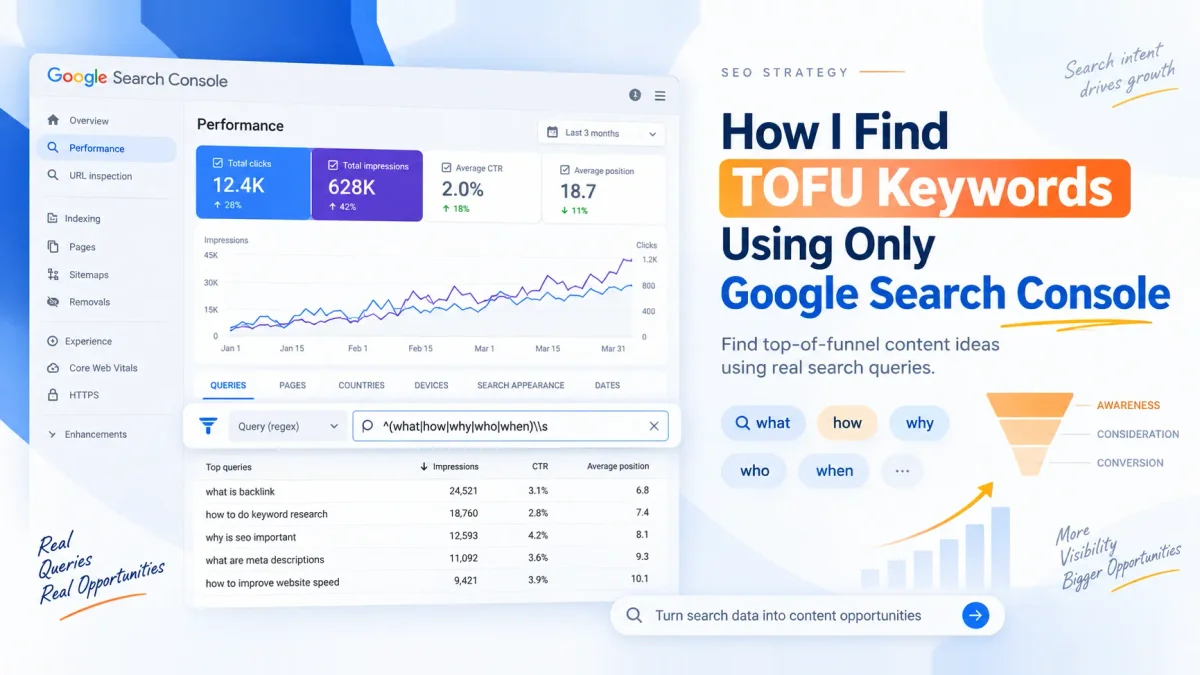
Filter those queries for question-based searches and you have a TOFU content list built on your own data. No subscription. No export limit. No guessing at search volume for a keyword you might not rank for.
Here is the exact process I run, start to finish.
Key takeaways
- GSC shows queries your site already ranks for. A keyword tool shows estimates for queries it might.
- A custom regex filter isolates question-based searches in about 30 seconds.
- The pattern
^(what|how|why|who|when)\smatches queries starting with those five words. - Sort by impressions to find pages getting seen but not clicked.
- Three situations need three different fixes. Improve, create, or rewrite the title.
- This method finds TOFU opportunities you already have. It does not find topics you have never touched.
What TOFU means
TOFU stands for top of funnel. It is the stage where someone is learning about a problem, not shopping for a fix.
Three stages sit in a typical buyer journey.
Top of funnel is learning. Queries like "what is technical SEO" or "how does a crawl budget work."
Middle of funnel is comparing. "Best SEO tools for small agencies" or "Ahrefs vs Semrush."
Bottom of funnel is buying. "SEO agency pricing" or "hire a technical SEO consultant."
TOFU queries matter because they reach people before they have picked a vendor. You answer a question, they remember your name. Six weeks later when they are ready to buy, you are already familiar to them.
The regex in this article is how you spot those queries in GSC. People who type what, how, why, who, or when are in learning mode. People who type “best” or “price” or “vs” are further down the funnel. Different words, different stage.
Why GSC beats a keyword tool for this
A keyword tool tells you what people search for in your country. GSC tells you what people searched for before they found you.
Those are different lists, and for TOFU work the second one is more useful. If your site already shows up for “how does local SEO work” at position 14, you have proof of relevance. Google has decided your page belongs in the results. That is a stronger starting point than a keyword with 2,400 monthly searches and no existing page.
For TOFU specifically, that limitation matters less than you would think. Most sites have more question queries in their GSC data than they have content to answer. The bottleneck is not ideas. It is filtering.
The filter that does the work
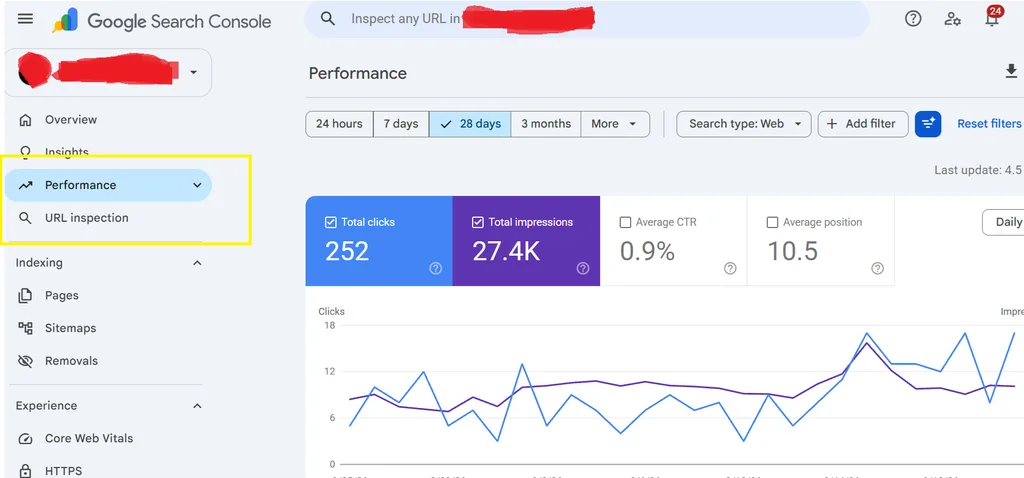
Open Google Search Console. Click Performance in the left sidebar, then Search Results. The Queries tab is already selected by default. You will see a list of search terms your site appeared for.
Now click the dropdown at the top that says Queries. Select Custom (regex) from the list.
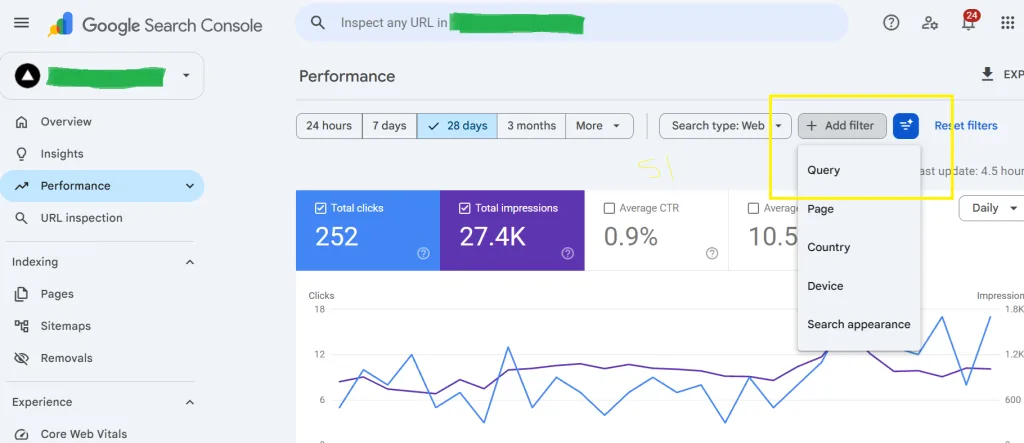
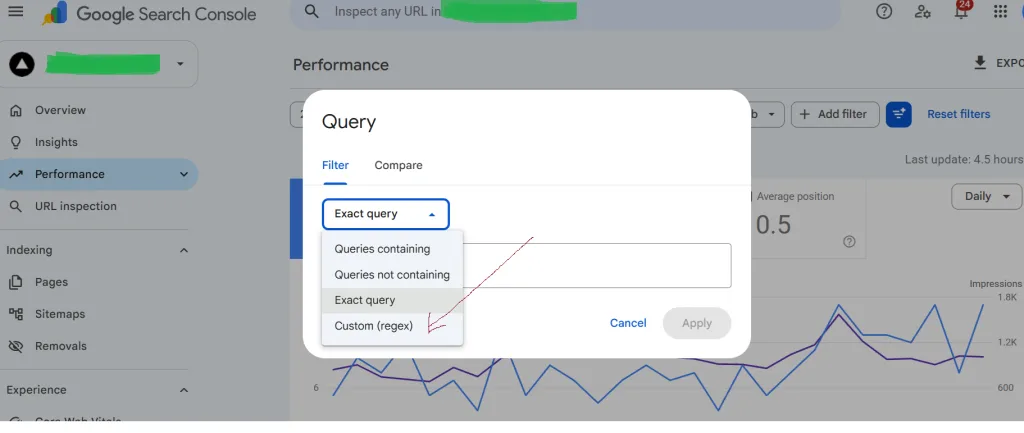
A text box appears. Paste this pattern.
^(what|how|why|who|when)\s
Click Apply.
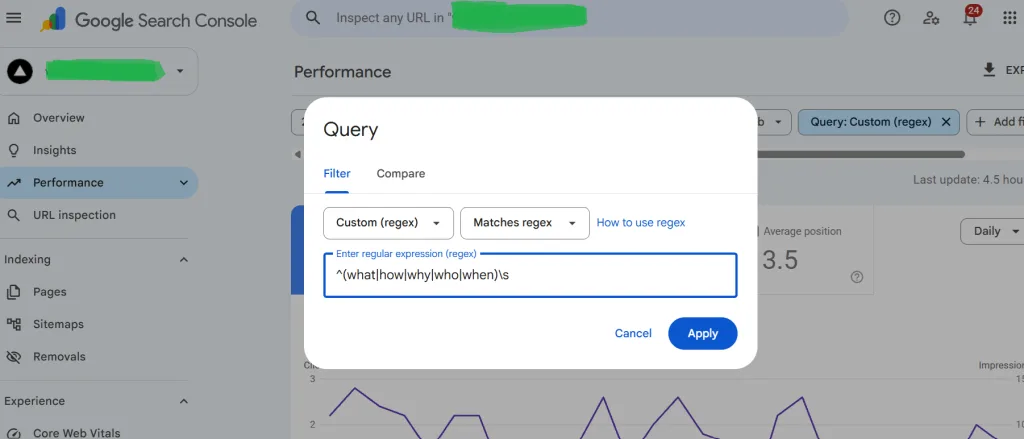
The list shrinks to queries starting with one of those five words, followed by a space. In plain English, the filter asks GSC to show only queries that open with what, how, why, who, or when.
That is the whole trick. You now have a list of TOFU searches your site already ranks for.
What the results look like
Once the filter is applied, you have a live list of learning-based searches your site appears for. These are people early in the buying journey. They want to understand something, not buy something.
That makes them perfect for blog posts, guides, and educational content. The goal with these queries is awareness. Not conversion. Not yet.
Now look at three columns next to each query.
Pages
Which URL from your site is ranking for that query. Sometimes it is the page you expected. Often it is not.
Average position
Where you currently sit. Position 8 to 20 is the sweet spot for this exercise. You are visible enough to get impressions, far enough down that a small improvement moves you onto page one.
CTR
How often people click when they see you. High impressions with low CTR means the query is being seen and ignored. That is a title and meta description problem, not a content problem.
Three situations, three fixes
Every query in the filtered list falls into one of three buckets. Each needs a different response.
| What you see | What it means | What to do |
|---|---|---|
| Ranking on page 2, position 11 to 20 | Google thinks the page is relevant, but it is not strong enough to rank higher | Improve the existing page. Better structure, clearer answers, real examples, an FAQ block |
| Impressions but no relevant page | You are ranking for a query with a page that does not actually answer it | Create a dedicated post for that query. Do not force it onto an unrelated page |
| High impressions, low CTR | You rank well but people are not clicking. The title does not match what they expected | Test a new title and meta description. Match the wording of the query. Answer the question in the description |
The first bucket is the fastest win. A page sitting at position 12 for a query with 800 monthly impressions needs a refresh, not a rewrite. Add an FAQ section. Tighten the introduction so the answer appears in the first two sentences. Add one specific example. That is often enough to move it to position 6 or 7.
The second bucket is where new content comes from. If GSC shows you appearing for “how to audit a SaaS site” but your only related page is a service page, you have a content gap that Google already told you about.
The third bucket is the most misunderstood. A page ranking at position 3 with a 1.2% CTR has a title problem. Rewrite the title to match the searcher’s language. Not your brand language. Theirs.
What this will not do
Be clear about the limits before you rely on this method.
It will not find topics you have never appeared for. If your site has zero pages about technical SEO, GSC will not show you technical SEO queries. You need a keyword tool or a competitor gap analysis for that.
It will not tell you search volume. GSC gives impressions, which is a different number. A query with 12,000 monthly searches might only send you 200 impressions because you rank at position 40. A query with 400 monthly searches might send you 300 impressions because you rank at position 3. Impressions tell you what is actually happening on your site. That is the number that matters.
It will not replace judgment. A query with high impressions and no relevance to your business is still a bad target. Filter for questions, then filter again with your brain.
FAQ
Do I need to know regex to use this? +−
Can I use this on a brand new site with no GSC data? +−
What date range should I use? +−
Should I filter by country or device? +−
How often should I run this? +−
What if the filter returns zero queries? +−
Does this work for local businesses? +−
Where to start
Open GSC. Go to Performance, Search Results, Queries. Click the dropdown and choose Custom regex. Paste ^(what|how|why|who|when)\s and click Apply. Sort by impressions.
Ten minutes of work. You now have a content list built on your own site’s data, with three clear actions to take depending on what each row shows.
Run it once. Export the list. Do it again next month and compare.
If you want help turning that list into a publishing plan that actually moves rankings, book an AI visibility audit. We will pull your GSC data, find the page 2 queries worth improving, and map the content gaps you have not covered yet.
Have questions about this article?
Ask the AI assistant anything — it has context on everything you just read.
AI Assistant
Ask about this article
I can summarize this article, explain concepts, and suggest related posts on SEOwebster.com.
Try asking